Jackie Saulmon Ramirez
- Member for
- 18 years 3 months 4 days
- Find a Grave ID
- Memorial ID
- 236564562
Fallen Graver
Sadly, Jackie Saulmon Ramirez has passed away. Please consider visiting their Find a Grave memorial page and leaving some virtual flowers. Their enthusiasm for cemeteries and willingness to help future generations lives on through their contributions to Find a Grave.
Bio
HOW TO GET GREAT PHOTOS
FOR FIND-A-GRAVE
Take Pride in Your Work!
-Plan time of day for photo. In direct sun you may not be able to read a stone. Watch for glare.
-Take extra batteries.
-Make sure your camera's SD Card is inside the camera or carry an extra.
-Reduce resolution setting on your camera, but not too low.
-Try to match the resolution to the highest number compatible with FindAGrave's limits. The higher the resolution, the better the photo will be. Too small and it will 'pixelate' the photo.
---750 KB maximum file size
---300-1200 pixel width
-Wear a wide brim hat. That will 'shade' your digital camera so you can better view the L.C.D. screen.
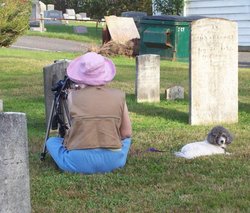
-Get down to eye level; stoop on one knee or sit on the ground. The difference is astounding!
-Get close enough to read the headstone.
-Take second shot to show the stone's area.
-Move plants to get all the words & dates. Replace when finished.
-Get the DATES; family and researchers NEED dates!
-If more than one name appears on the headstone, show both names in the photo and list the information on both memorials on FindAGrave; if related, link memorials. Second and third photos can show close-ups.
-Trim or brush GRASS off the stone so the letters show. [Do not trim in-the-ground plants!]
-Center the headstone.
-Get a photo of the ENTIRE stone or monument no matter how tall, no matter how wide.
-Take close-up of the inscription.
-Use a tripod for a clear photo.
-Use a reflector to improve headstone readability. Light helps when held to one side to create shadows in the lettering.
-No 'reflector?' Use a mirror, tin foil, bright light, car windshield's reflector, etc.
-FEEL the letters for hard to read headstones.
-Write down notes for hard-to-read headstones.
-Use a tape recorder to make ‘notes' till you can enter it on FindAGrave.
-A flags' folds can be moved so they don't cover the writing.
-Avoid taking shots with snow on the ground; too much light and glare.
-Every headstone has the same value no matter what they paid for it.
-Think of a family member viewing the memorial you are creating.
-Be aware of clothing, hair, fingers, etc. in lens shot.
-Keep friends that came with you out of the shot.
-Don't get your shadow in the photo. It's very distracting from the stone.
-Don't get your reflection on a shiny stone.
-Don't take photo from an angle unless it helps readability.
-Don't go at night unless requested and take second photo during day.
-Don't go for numbers; go for quality.
-Don't get your vehicle in the photo.
-If you accidentally get your vehicle or foot in the photo, crop or remove with 'clone' tool OR retake the photo.
-Never try to 'clean' the stone. Use only a cloth or soft brush.
-Do not touch lichens! They are fungal organisms that may damage stones but to try and remove them could do MORE harm.
-Any photo is better than no photo at all; it proves the grave is there.
-If you bring a dog or other pet, make sure cemeteries allow them on the grounds. Be sure you pick up any litter (poops, BMs). "Doggie bags" are part of my graving equipment.
PHOTO EDITING
-Do ANY editing, including cropping, to the photo BEFORE you reduce the final size. Any editing increases the file size of the photo.
-Edit as little as possible but DO enhance if it will make the stone clearer or easier to read. 'Remove scratches' or 'Sharpen' may aid the ability to read older or worn stones.
-Crop but DO show some space around the stone; it enhances the viewers' experience. A second photo may show a close up of the individual stone or inscription.
ON THE MEMORIAL
-Don't write as if you were sending an e-mail. Use capitalization, commas, quotations, periods, etc.
-Credit sources for information or BIOs.
-BIO note body should not be all caps.
-Don't say "buried with" unless they are in the same casket. Say "buried beside" or "buried among."
-When the last name has two parts, leave a space between the 1st part and the second part. "Van Hise," not "VanHise." If the stone shows no space—then do not leave a space. Follow the stone.
-Unless your stone is that of Harry S Truman, the initial needs a period "." after it.
-Try to add the inscription; put periods or dashes where the lettering is worn away.
-To read a difficult stone, it may help to increase contrast in your photo editing program while transcribing. Return photo to 'natural' before uploading to FindAGrave.
-People before papers! Photos of faces & family, then the stone, then any documents that would include death certificates, obituary notices or articles.
-Ask yourself, "If this was my family member, would I like this memorial?"
-Take one final look over the memorial for spelling or other errors.
If you have tips or suggestions, please feel free to e-mail me.
******************************
My daughter Francisca has loved cemeteries since she was about three and barely tall enough to look outside the car as we passed. Cemetery stones drew her like a magnet! She is now almost 30 and we still love these 'cities of stone.'
As for me, FindAGrave is an outlet for my love of art, genealogy, history and photography all rolled into one. I have been known to 'sponsor' a memorial or two for its beauty, historic or cultural significance. Sponsoring a loved one's memorial is also a sincere gift to family or a friend and also helps support FindAGrave in a meaningful way.
Anyone has my permission to take copies of any of my photos on FindAGrave. I put them here to share.
DO NOT PUT ANY SUBSTANCES ON A GRAVESTONE TO READ IT
Ammonia, Baby Powder, Baking Powder, Baking Soda,Bleach, Chalks, Charcoal, Chocolate, Cleansers, Cocoa, Corn Meal, Cornstarch, Crayons, Detergents, Dirt, Felt-Tip Markers, Flour, Graphite, Inks, Paints, Pencils, Peroxide, Powdered Sugar, Shaving Cream, Shoe Polish, Snow, Soaps, Spray Paint, Tempera, Etc.
Always Be Kind
HOW TO GET GREAT PHOTOS
FOR FIND-A-GRAVE
Take Pride in Your Work!
-Plan time of day for photo. In direct sun you may not be able to read a stone. Watch for glare.
-Take extra batteries.
-Make sure your camera's SD Card is inside the camera or carry an extra.
-Reduce resolution setting on your camera, but not too low.
-Try to match the resolution to the highest number compatible with FindAGrave's limits. The higher the resolution, the better the photo will be. Too small and it will 'pixelate' the photo.
---750 KB maximum file size
---300-1200 pixel width
-Wear a wide brim hat. That will 'shade' your digital camera so you can better view the L.C.D. screen.
-Get down to eye level; stoop on one knee or sit on the ground. The difference is astounding!
-Get close enough to read the headstone.
-Take second shot to show the stone's area.
-Move plants to get all the words & dates. Replace when finished.
-Get the DATES; family and researchers NEED dates!
-If more than one name appears on the headstone, show both names in the photo and list the information on both memorials on FindAGrave; if related, link memorials. Second and third photos can show close-ups.
-Trim or brush GRASS off the stone so the letters show. [Do not trim in-the-ground plants!]
-Center the headstone.
-Get a photo of the ENTIRE stone or monument no matter how tall, no matter how wide.
-Take close-up of the inscription.
-Use a tripod for a clear photo.
-Use a reflector to improve headstone readability. Light helps when held to one side to create shadows in the lettering.
-No 'reflector?' Use a mirror, tin foil, bright light, car windshield's reflector, etc.
-FEEL the letters for hard to read headstones.
-Write down notes for hard-to-read headstones.
-Use a tape recorder to make ‘notes' till you can enter it on FindAGrave.
-A flags' folds can be moved so they don't cover the writing.
-Avoid taking shots with snow on the ground; too much light and glare.
-Every headstone has the same value no matter what they paid for it.
-Think of a family member viewing the memorial you are creating.
-Be aware of clothing, hair, fingers, etc. in lens shot.
-Keep friends that came with you out of the shot.
-Don't get your shadow in the photo. It's very distracting from the stone.
-Don't get your reflection on a shiny stone.
-Don't take photo from an angle unless it helps readability.
-Don't go at night unless requested and take second photo during day.
-Don't go for numbers; go for quality.
-Don't get your vehicle in the photo.
-If you accidentally get your vehicle or foot in the photo, crop or remove with 'clone' tool OR retake the photo.
-Never try to 'clean' the stone. Use only a cloth or soft brush.
-Do not touch lichens! They are fungal organisms that may damage stones but to try and remove them could do MORE harm.
-Any photo is better than no photo at all; it proves the grave is there.
-If you bring a dog or other pet, make sure cemeteries allow them on the grounds. Be sure you pick up any litter (poops, BMs). "Doggie bags" are part of my graving equipment.
PHOTO EDITING
-Do ANY editing, including cropping, to the photo BEFORE you reduce the final size. Any editing increases the file size of the photo.
-Edit as little as possible but DO enhance if it will make the stone clearer or easier to read. 'Remove scratches' or 'Sharpen' may aid the ability to read older or worn stones.
-Crop but DO show some space around the stone; it enhances the viewers' experience. A second photo may show a close up of the individual stone or inscription.
ON THE MEMORIAL
-Don't write as if you were sending an e-mail. Use capitalization, commas, quotations, periods, etc.
-Credit sources for information or BIOs.
-BIO note body should not be all caps.
-Don't say "buried with" unless they are in the same casket. Say "buried beside" or "buried among."
-When the last name has two parts, leave a space between the 1st part and the second part. "Van Hise," not "VanHise." If the stone shows no space—then do not leave a space. Follow the stone.
-Unless your stone is that of Harry S Truman, the initial needs a period "." after it.
-Try to add the inscription; put periods or dashes where the lettering is worn away.
-To read a difficult stone, it may help to increase contrast in your photo editing program while transcribing. Return photo to 'natural' before uploading to FindAGrave.
-People before papers! Photos of faces & family, then the stone, then any documents that would include death certificates, obituary notices or articles.
-Ask yourself, "If this was my family member, would I like this memorial?"
-Take one final look over the memorial for spelling or other errors.
If you have tips or suggestions, please feel free to e-mail me.
******************************
My daughter Francisca has loved cemeteries since she was about three and barely tall enough to look outside the car as we passed. Cemetery stones drew her like a magnet! She is now almost 30 and we still love these 'cities of stone.'
As for me, FindAGrave is an outlet for my love of art, genealogy, history and photography all rolled into one. I have been known to 'sponsor' a memorial or two for its beauty, historic or cultural significance. Sponsoring a loved one's memorial is also a sincere gift to family or a friend and also helps support FindAGrave in a meaningful way.
Anyone has my permission to take copies of any of my photos on FindAGrave. I put them here to share.
DO NOT PUT ANY SUBSTANCES ON A GRAVESTONE TO READ IT
Ammonia, Baby Powder, Baking Powder, Baking Soda,Bleach, Chalks, Charcoal, Chocolate, Cleansers, Cocoa, Corn Meal, Cornstarch, Crayons, Detergents, Dirt, Felt-Tip Markers, Flour, Graphite, Inks, Paints, Pencils, Peroxide, Powdered Sugar, Shaving Cream, Shoe Polish, Snow, Soaps, Spray Paint, Tempera, Etc.
Always Be Kind
Following


Contributions
Advertisement